
Load your PNGs into a browser PNG to GIF tool in frame order, set one delay between frames (100 ms gives 10 frames per second), choose a loop setting, and download the animated GIF. Our free PNG to GIF converter takes up to 60 PNG files and 20 MB in total. It runs inside your browser and asks for no account or credits.
Most failed attempts go wrong before the first click: one PNG saved as a GIF, mixed frame sizes, or a random delay.
Quick answer
- Frames: up to 60 PNG files, 20 MB combined, each side 1600 px or less.
- Size: export every frame at the same pixel size, because the first PNG sets the canvas.
- Delay: one value for all frames, 20 to 2000 ms in 10 ms steps. Start at the 100 ms default.
- Loop: 0 loops forever (the default), -1 plays once, and 1 to 100 sets a repeat count.
- File too big? Run the result through the GIF compressor.
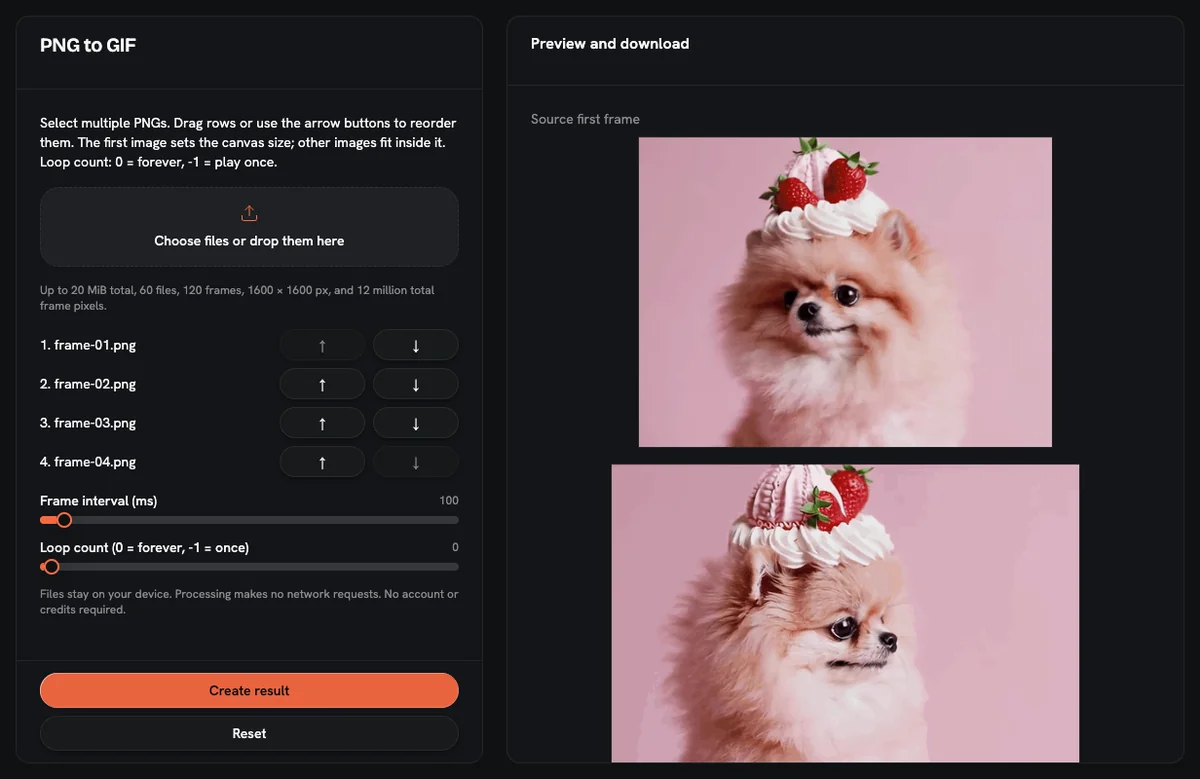
Why does "Save as GIF" give a still image?
An animated GIF from images is a stack of frames shown one after another. Opening a single PNG in an image editor and saving it as GIF changes the file format, but the file still holds one frame. So the common tip "just save it as GIF" gives you a picture that never moves.
To get motion, each pose must exist as its own PNG, and a tool has to put those PNGs together as GIF frames, in the order you choose.
Prepare your PNG frames first
- Use one pixel size for every frame. The converter makes the first image the canvas and scales every other image to fit inside it. A frame with a different size or shape gets resized, so the subject can jump or shrink mid-animation.
- Name files with zero-padded numbers. Use frame-01.png, frame-02.png and so on. Some file lists sort frame-10 before frame-2 when the zero is missing.
- Check your pixel budget. The tool allows 12,000,000 pixels in total across all frames, and the source PNGs count toward the same total. When every PNG matches the canvas, that works out to 52 frames at 480 × 480, 10 frames at 1080 × 1080, and 4 frames at 1600 × 1600. At 400 × 400 or smaller, the 60-file cap is the limit you hit first.
How to make the GIF, step by step
- Open the PNG to GIF tool and select all your frames at once: up to 60 PNG files, 20 MB combined. The tool accepts PNG only, so export any JPG or WebP frames as PNG first.
- Check the frame list. The first image becomes frame 1 and sets the canvas size. Use the move up and move down buttons to fix any frame that sits in the wrong place.
- Set the frame interval. The slider runs from 20 to 2000 ms in 10 ms steps and starts at 100 ms.
- Set the loop count: 0 for forever, -1 for a single play, or a number from 1 to 100 for a fixed repeat count.
- Create the GIF and check the preview for any frame that flashes out of place.
- Download the file and check its size. A single run is cut off after 60 seconds, and the finished GIF can be up to 40 MB.
Which frame delay should you choose?
The GIF frame delay is how long each frame stays on screen. Frames per second equal 1000 divided by the delay in milliseconds, and one loop lasts the frame count times the delay.
| Delay | Frames per second | 10 frames last | Typical use |
|---|---|---|---|
| 20 ms | 50 | 0.2 s | Shortest setting; dense renders |
| 40 ms | 25 | 0.4 s | Smooth motion from a 3D or video render |
| 100 ms | 10 | 1 s | Default; sprite walk cycles |
| 200 ms | 5 | 2 s | Emotes with 3 or 4 poses, blinks |
| 500 ms | 2 | 5 s | Screenshot tutorials |
| 1000 ms | 1 | 10 s | Comic panels, before and after |
| 2000 ms | 0.5 | 20 s | Longest setting; product slideshows |
Every frame gets the same delay in this tool. To hold one frame longer, add that PNG more than once: at 100 ms, three copies of your final pose keep it on screen for 300 ms. Each extra copy counts toward the 60-file and 12,000,000-pixel limits.
A worked example: three emote poses at 200 ms finish one cycle in 0.6 seconds, then repeat if the loop is set to 0.
Set the loop: once, forever, or a count
Loop forever (0) suits emotes, stickers and sprite cycles. Play once (-1) suits a reveal or short demo where the last frame carries the message, since a GIF that has finished rests on its final frame. A count from 1 to 100 fits a banner that should settle after a few plays. Before you share a counted loop, preview it in the app where you plan to post it.
What happens to PNG transparency?
PNG can store partial transparency, such as a soft shadow or an anti-aliased outline. GIF cannot: each GIF pixel is either fully transparent or fully opaque. How semi-transparent PNG pixels come out depends on the converter, so check the preview for soft edges.
Two habits help: draw frames with hard edges, or flatten them onto the exact background color of the page or chat theme where the GIF will appear.
Keep the file size in check
If the download is too heavy for its destination, open the GIF compressor. It has three sliders: colors from 2 to 256 (default 64), keep 1 of every 1 to 10 frames (default 2), and scale from 10% to 100% (default 75%). Dropped frames hand their time to the frames that remain, so the animation runs just as long.
Compression here is lossy and does not shrink every GIF, so compare the before and after sizes shown. The guide on compressing a GIF without losing quality explains the trade-off behind each slider. If you want a caption, add text to the GIF before compressing it.
For emotes, Discord's help center says custom emoji files must be under 256KB, and the Discord emoji resizing guide walks through that case.
Frequently asked questions
Can I set a different delay for each frame?
The PNG to GIF tool applies one delay to all frames, so per-frame timing is not available. To fake a pause, repeat a PNG in the list; each extra copy adds one more interval of hold time. For true per-frame timing, a layered image editor with a frame timeline fits better.
How many PNG images can one GIF hold?
The PNG to GIF tool takes up to 60 PNG files with a combined size of 20 MB. Each image can be up to 1600 px per side, all frames together can total 12,000,000 pixels, and the finished GIF can reach 40 MB.
Are my PNG files uploaded anywhere?
PNG files stay on your device, because the conversion runs locally in your browser. The free GIF tools need no sign-up and use no credits.
What if I only have one photo?
A single photo becomes a one-frame GIF that never moves. For motion from one still, AI image-to-video is the right kind of tool; the guide on animating a photo with AI covers that route, which requires an account and credits.
Why does my GIF look grainier than the PNG frames?
Grain and banding come from the 256-color limit of a GIF palette, which hits photos and gradients hardest. Flat-color frames such as pixel art, emotes and UI screenshots keep their look much better.
The PNG to GIF converter and five other GIF tools on AnimateImage run in your browser for free.