
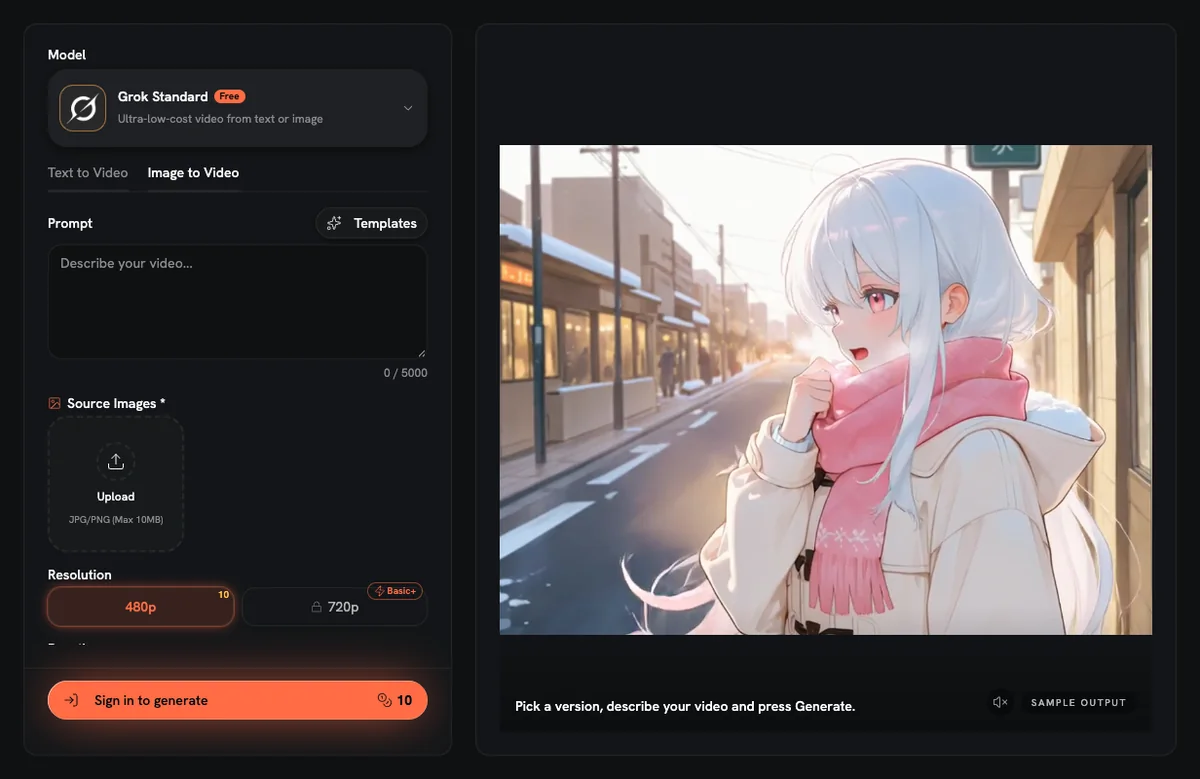
You can animate a photo with AI by uploading it to the AI video studio on our home page and describing the motion; a new account's 10 free credits cover one 480p, 6-second clip. That clip runs on Grok Standard, the default model, in photo-to-video mode. Generating needs a signed-in account, because credits belong to an account.
The free plan cannot download the finished video. Downloads need a paid plan (Basic or higher) or a one-time credit pack, and both add credits.
So "free" here has a narrow meaning: 10 credits, granted once to a new account, which pay for one 6-second Grok Standard clip at 480p. Free does not include a video download, a daily credit refill or unlimited runs. If you already have several frames, a free browser tool may fit better (see the comparison below).
Quick answer: the free run in numbers
| Setting | Value for the free test clip |
|---|---|
| Account | Required before generating |
| Welcome credits | 10, granted once to a new account |
| Model | Grok Standard (the default) |
| Mode | Photo to video |
| Source photos | 1 (Grok Standard accepts up to 3) |
| Resolution | 480p |
| Length | 6 seconds |
| Cost per run | 10 credits |
| Output | A video clip, not a GIF |
| Download | Paid plan (Basic and up) or a credit pack |
How do I animate a photo, step by step?
- Sign in or create an account. A new account receives 10 credits, and the generator only runs for signed-in users.
- Open the generator on the home page. Keep Grok Standard selected and switch to photo-to-video mode.
- Upload 1 photo. Grok Standard accepts up to 3 source images in photo mode, but one clear photo keeps the first test simple.
- Write one motion idea for the 6-second clip. For example: "The dog slowly turns its head toward the camera."
- Set 480p and 6 seconds. On Grok Standard this run costs 10 credits, which is the whole welcome balance.
- Generate, then check the clip. Saving the video file as a download needs a paid plan or a credit pack.
Since the free balance covers a single run, choose the photo and the prompt with care first.
Which photo gives the model a clear job?
A photo with one subject is the safer choice for a first run. The model has to decide what moves, and a single person, pet or object leaves less to guess.
Look for these traits before you upload:
- One subject that fills a good part of the frame, not a crowd or a small figure in the distance.
- Sharp focus on that subject, without heavy motion blur or strong compression artifacts.
- A face that is visible for portraits, either straight on or at a slight angle.
- A plain or simple background, so the motion you ask for is easy to see.
These are general guidelines, not guarantees. Results still vary with the photo, the prompt and the model.
How should I write the motion prompt?
A motion prompt works as an instruction for one action. A short clip has room for one clear movement, so stacking several effects asks for more than the clip can show.
Pick either subject motion or camera motion for each run, then describe it plainly:
- Portrait: "She blinks and slowly turns her head toward the camera."
- Pet: "The cat's ears twitch and it looks to the left."
- Landscape: "Clouds drift slowly across the sky while the camera stays still."
- Illustration: "The character's hair and scarf move in a light wind."
Add what should stay still if it matters, for example "the background does not move."
A focused prompt does not promise a clean clip. It does give you one variable to change if you rerun later with paid credits.
What should I expect from a 480p, 6-second clip?
A 480p clip is a small frame size. Treat the free result as a motion test, good for checking whether the idea works on a phone screen, not as a final file for a large display.
Six seconds holds one short action, not a sequence of scenes.
The free plan offers more settings than this one test run. It lists 12 of 18 models, up to 768P on Hailuo 2.3 Standard and up to 15 seconds on Grok or HappyHorse. Credits on Grok Standard are charged per second of video, so a clip longer than 6 seconds costs more than 10 credits.
What not to expect from the free run:
- A GIF file. The studio returns a video clip.
- A download. Downloads need a paid plan or a credit pack.
- A second free clip. The 10 welcome credits are used up by one 480p, 6-second Grok Standard run.
- Every frame matching the original. Compare faces, hands and any lettering against your source photo before you share or rerun.
Which approach fits: AI video, flipbook or captioned GIF?
Several different jobs hide behind "make my picture move."
AI image to video fits when you have one photo and want motion that was never in it: a blink, a head turn, moving water. The model generates new frames from your photo. This route needs an account and credits, the result is a video, and downloads need a paid plan or a credit pack. Because a video model does the rendering, your photo is sent to that model.
A frame flipbook fits when you already have several images and want them played in order. PNG to GIF takes up to 60 PNG files (20 MB in total) and plays them at one interval between 20 and 2,000 ms, looping forever by default. The tool uses no AI, so it does not invent motion between your frames. Processing runs in your browser, files are not uploaded, and no account or credits are needed. The guide on how to make a GIF from PNG images walks through frame order and timing.
Adding text to an existing GIF fits when the animation already exists and you only need a caption. Add Text to GIF accepts a GIF up to 20 MB, runs in your browser and needs no account.
One gap to know about: none of the free GIF tools accepts a video file. They take GIF input (PNG for PNG to GIF), so turning an AI clip into a GIF is a job for a separate video-to-GIF converter.
Frequently asked questions
Is there a free way to animate a photo with AI?
The free route covers one clip: a new account's 10 credits pay for one 480p, 6-second photo-to-video run on Grok Standard. A second run, or a longer one, needs more credits from a paid plan or a one-time credit pack.
Can I download the animated video on the free plan?
Generated videos cannot be downloaded on the free plan; downloads need a paid plan (Basic or higher) or a one-time credit pack.
Do I need an account to animate a photo?
An account is required for the AI studio, because credits are attached to an account. The six free GIF tools are different: they run in your browser without an account or credits.
Will the result be a GIF?
The AI studio returns a video clip, not a GIF. The free GIF tools accept only GIF or PNG files, so they cannot convert that clip into a GIF.
Can a free clip be longer than 6 seconds?
Free-plan settings reach 15 seconds on Grok or HappyHorse, but the welcome credits do not stretch that far on Grok Standard. Grok Standard charges credits per second, and the 10 free credits match one 6-second clip at 480p.
AnimateImage at animateimage.org is an independent site and is not affiliated with other apps or companies that use a similar name.